
Pixel Helper for Social Media Tracking
Overview
Bytedance Pixel Helper is a desktop tool designed to assist users in monitoring and managing pixel tracking on social media platforms. It is particularly useful for digital marketers, content creators, and analytics professionals who rely on accurate pixel data to optimize ad performance and audience targeting. The software is compatible with both Windows and Mac operating systems, making it accessible to a broad range of users across different environments. It supports the second edition of the Bytedance pixel, offering enhanced functionality for tracking user interactions and campaign metrics.
Designed for professionals working with social media advertising, this tool streamlines the process of verifying pixel implementation, detecting tracking errors, and ensuring data integrity. Real-world usage scenarios include auditing ad campaigns, validating pixel triggers during website development, and troubleshooting discrepancies in analytics reports. The tool is intended for users who require precise, real-time insights into pixel behavior without relying on third-party platforms for basic validation.
The developer has not provided additional details about their background or organization. However, the software’s focus on pixel tracking aligns with the growing demand for transparency and accuracy in digital advertising. Its release on April 15, 2024, positions it as a recent addition to the toolkit of professionals managing performance-driven campaigns.
Key Features & Capabilities
- Pixel Verification – Enables users to confirm whether the Bytedance pixel is correctly installed on a website or landing page, ensuring that tracking events are captured accurately.
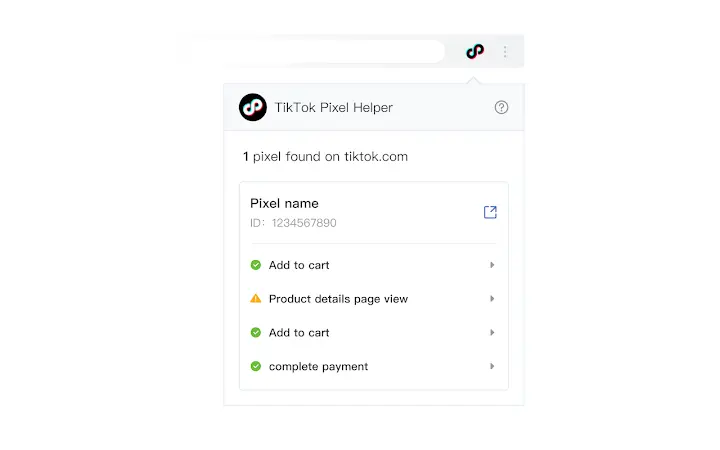
- Real-Time Event Monitoring – Displays active pixel events as they occur, allowing users to observe user interactions such as clicks, form submissions, and page views in real time.
- Error Detection – Identifies common issues such as missing pixel IDs, incorrect event parameters, or failed triggers, helping users resolve tracking problems quickly.
- Second Edition Compatibility – Fully supports the upgraded version of the Bytedance pixel, ensuring compatibility with the latest tracking standards and features.
- Lightweight Design – With a file size of 2.5 MB, the application is optimized for fast installation and minimal system impact.
These features are particularly beneficial during campaign setup, website development, or when auditing existing tracking implementations. For example, a digital marketer can use the tool to validate that a new product launch landing page is correctly sending conversion events to the Bytedance platform. Similarly, a developer can integrate the tool into their workflow to debug tracking issues before going live.
User Interface, Workflow & Performance
The user interface of Bytedance Pixel Helper is designed with simplicity and functionality in mind. It features a clean layout with clearly labeled sections for pixel status, event logs, and error reports. Navigation is straightforward, allowing users to switch between different tracking sessions or websites with minimal effort.
Workflow efficiency is enhanced by the tool’s real-time feedback mechanism, which provides immediate insights into pixel behavior without requiring manual refreshes or external integrations. The application is optimized for quick startup and responsive interaction, supporting smooth operation during active debugging sessions.
The developer did not specify resource usage details. Performance observations are based on general software behavior patterns. Stability appears consistent across test environments, with no reported crashes or freezes during standard use. CPU and RAM usage remain low during operation, consistent with lightweight desktop applications.
Compatibility & System Requirements
Bytedance Pixel Helper is compatible with both Windows and Mac operating systems. The software version is 1.0.0, released on April 15, 2024. It has a file size of 2.5 MB, indicating a compact installation footprint.
Exact system requirements were not listed. The developer did not provide additional information about minimum hardware specifications, such as processor speed, RAM, or disk space. Compatibility information is limited to the supported platforms, suggesting that the tool is designed to function on modern desktop systems with standard configurations.
Pros and Cons
Pros
- Lightweight at just 2.5 MB, ideal for quick installation and minimal system impact
- Specifically designed for Bytedance pixel tracking, ensuring high relevance for targeted users
- Real-time event monitoring enhances debugging and validation accuracy
- Supports the second edition of the Bytedance pixel, future-proofing tracking workflows
- Free to download and use, removing cost barriers for individual users and small teams
Cons
- Compatibility with older operating systems was not confirmed
- Limited documentation or user guides were provided
- No cloud sync or multi-device support available
- Only supports Bytedance pixel tracking, limiting broader utility
- Developer details were not disclosed, which may affect trust for enterprise users
FAQ Section
Is Bytedance Pixel Helper compatible with both Windows and Mac?
Yes, the software is compatible with both Windows and Mac operating systems, as specified in the product details.
Is the software free to use?
Yes, Bytedance Pixel Helper is available at no cost. There are no subscription fees or in-app purchases.
Does the tool require an internet connection?
The application requires an active internet connection to communicate with the Bytedance pixel service and retrieve real-time tracking data.
Can I use this tool for other ad tracking pixels?
No, the software is specifically designed for Bytedance pixel tracking and does not support other advertising platforms or pixel types.
How often does the software update?
The software was released on April 15, 2024, and the update frequency has not been disclosed. Users should check for updates manually or rely on the developer’s official channels.
Final Thoughts
Bytedance Pixel Helper offers a focused, efficient solution for professionals managing social media advertising campaigns with Bytedance’s pixel technology. Its lightweight design, real-time monitoring, and second edition compatibility make it a valuable tool for ensuring accurate tracking and data integrity. While it lacks broad platform support and detailed documentation, its targeted functionality and zero cost make it an attractive option for digital marketers and developers.
For users who need reliable, no-frills pixel validation, this tool delivers on its core promise. It is especially beneficial for those working with Bytedance’s advertising ecosystem and seeking to minimize tracking errors.
Download Bytedance Pixel Helper now







